Saturday, April 4, 2009

SQL Sets 1.5 Released – Now With Compare Sets

I'm very excited to announce the release of SQL Sets 1.5! It's been about two months since the last official release, but I think the wait and effort has been worth it. The killer feature I've been working on is the ability to do full compares on two distinct data set documents. The result is what is a called a Compare Set.

What this means is you can take a data set document you created two weeks (minutes, hours, days) ago based on query N and compare the results to a data set document you created today, also based on query N. You will get a line-by-line, field-by-field result set showing updates, inserts and deletes (in addition to those rows that haven't changed). The resulting Compare Set, which is itself a Portable Data Set Document, can be saved, shared, bookmarked and annotated.

I really think the utility of this feature is something that will be enjoyed by developers, testers, database folks and auditors alike. The ability to quickly see what changed in your data sets as a result of normal business activity, a coding change or a data migration can be invaluable.

With the introduction of the Compare Set feature, we've also started offering two  versions of SQL Sets: SQL Sets Standard and SQL Sets Professional. It is the Professional version of SQL Sets that includes the new Compare Set functionality. The remainder of the updates include bug fixes, optimizations and better support for large data sets.

Tuesday, February 24, 2009

SQL Sets Version 1.0 Released


SQL Sets v1.0 was released on Friday, February 20th. We’re very excited to finally get the initial release version out there and look forward to your feedback. It was a very low-key launch……., there is going to be a follow-up release in about 1 month or so where we introduce what we think will be a killer feature: the ability to do row-by-row/column-by-column comparison on two SQL sets. That essentially means that our customers will be able to take snapshots of data, taken at a different time and place, and see exactly what has changed.

This set comparison feature will be bundled with some other new features, including full file encryption capabilities, and rolled into another product version called the SQL Sets Professional Edition. The version currently available will be renamed to the SQL Sets Standard Edition.

For those customers who buy the SQL Sets Standard Edition prior to the next release, we will offer them a free upgrade to the Professional Edition.

Friday, February 6, 2009

Feature in Focus – Deep Fetch Queries

This is the first in a series of posts that will be tagged Feature in Focus (FiF). The goal of these entries will be to further high-light some of the new and interesting ways in which SQL Sets allows users to capture, organize, share and collaborate on their relational data.

Today I'm going to talk about a feature that we call a Deep Fetch Query. Deep Fetch is simply a catchy name for what is essentially a recursive parent-child query. A recursive parent-child query is a query in which the rows for some root table (top level table) are returned along with related rows in that table's children, their children's children, their children's children's children and so on....you get the picture. It's a simple concept but also an incredibly powerful one. It's simple because it makes sense to want to look at and work with data in the context of its defined relationships to other data in a database. In a SQL Sets sense, it's powerful because we have a facility that lets you retrieve data in this manner in one simple step. The power of being able to do this quickly and easily is magnified as the size and complexity of the database grows. Here's how it works:

  1. Select new Deep Fetch Query from main menu (by right-clicking on a table in the database explorer)
  2. Choose the database connection and table you would like to run the Deep Fetch against
  3. Enter the query criteria to filter appropriate rows on this table (root parent)
  4. Click Execute  SQL Sets will interrogate database catalog and build appropriate query script to run recursive parent-child query...and then run it.
  5. Data is returned

Let's take a look at an example. We're going to use the DotNetNuke database as our sample database. For those not familiar with the DotNetNuke project, it is an open source CMS for the ASP.NET platform. The top level entity in this database schema is the Portal table. A Portal can contain multiple pages (Tabs) and each page can contain multiple modules (TabModules). These pages and modules in turn have many other attributes and entities associated with them. So, starting from the top:

1. Select Portals in the Connections Explorer, right click and choose New Deep Fetch Query. The Deep Fetch Query dialog is displayed. Enter 1 in the PortalID value column.

dfquery

2. Click Execute

3. The recursive parent-child query script is generated, executed against the database and the results are returned. In this case, queries were created for 45 tables and resulted in 1748 rows being returned.

Let's take a closer look at what we got for our money.....

a) Excerpt of of generated script... this one shows the TabModules table which is 1 tables removed from the Portals table (via the Tabs table) and the TabModuleSettings table which is 2 tables removed via the Module and TabModules tables respectively.

--[dbo.TabModules]
SELECT [dbo].[TabModules].*
FROM [dbo].[Portals] INNER JOIN [dbo].[Tabs]
      ON [dbo].[Portals].[PortalID] = [dbo].[Tabs].[PortalID]
   INNER JOIN [dbo].[TabModules]
      ON [dbo].[Tabs].[TabID] = [dbo].[TabModules].[TabID]
WHERE [dbo].[Portals].[PortalID] = 1

--[dbo.TabModuleSettings]
SELECT [dbo].[TabModuleSettings].*
FROM [dbo].[Portals] INNER JOIN [dbo].[Modules]
      ON [dbo].[Portals].[PortalID] = [dbo].[Modules].[PortalID]
    INNER JOIN [dbo].[TabModules]
      ON [dbo].[Modules].[ModuleID] = [dbo].[TabModules].[ModuleID]
    INNER JOIN [dbo].[TabModuleSettings]
      ON [dbo].[TabModules].[TabModuleID] =
[dbo]. [TabModuleSettings].  [TabModuleID]
WHERE [dbo].[Portals].[PortalID] = 1

B. Results pane.... the data for each of the 45 related tables are placed into a separate tab and grid.
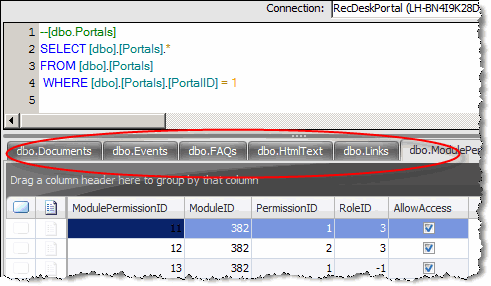
resulttabs

C. This data can be easily navigated using either the Table Navigator or the Relationship Navigator. In the case of the Relationship Navigator, the tree is arranged hierarchically by relationship. In the case of the Table Navigator, they are arranged sequentially in alphabetical order.

relnav

Hopefully this example showed how simple and powerful the Deep Fetch Query is. Now that we've created a SQL Set from a Deep Fetch Query, we can save it as a Portable Data Document and share it with co-workers and business partners or use for our own purposes. The bottom line is that in the time that it took you to read the first two paragraphs of this post, you would have been able to do the same thing with your own SQL Server databases and pulled back related data from 10, 20, 50 or 100 or more tables. Thanks for reading and please give us feedback as to how we can make this feature even better!

Friday, January 30, 2009

Welcome to SQL Sets

Hello and welcome to the SQL Sets product blog. It is here that we will communicate news, high light features, discuss future releases and offer tips & tricks for getting the most out of SQL Sets.

What is SQL Sets?

The one-floor elevator pitch for SQL Sets is:

SQL Sets allows you to quickly capture and organize snapshots of your SQL Server data into a single, self-contained file called a Portable Data Document.

Why SQL Sets (or What "pain" does this solve for me)?

There wouldn't be much point to the product if it didn't solve some fundamental "pain" experienced by IT professionals every day. In this case, it's the lack of an easy way to share, collaborate on and store snapshots/slices of SQL Server data. Sure, cutting and pasting from SQL Management Studio into emails and Word or Excel documents can get you part of the way there, but it is cumbersome and somehow leaves you wanting more.

Once the data is copied and pasted....it loses its context, is awkward to work with and cannot be easily refreshed...it is basically "homeless". The goal of SQL Sets is to provide a native document format and environment for working with these offline slices of your database. That's where the idea of a Portable Data Document comes into play. It is to SQL Sets what an .xls file is to Excel and a .doc file is to Word (sorry for stirring those painful SAT analogy memories ;-)).

The SQL Sets application is specifically tailored to work with relational data and provides shortcuts and utilities for extracting meaningful subsets of data from your database. It also allows you to work with data in ways that make sense for relational data, not free form text or numbers as Word and Excel are suited for. This functionality includes Bookmarks, Annotations, Grouping, Sorting and Filtering.

With that said, we look forward to hearing from you as to how we can improve on SQL Sets to make your life as an IT and business professional a little bit easier than it is today!